Remote offboarding is already complex. Add a damaged or faulty laptop on top of it, and the process could easily lead to delays. It may also include uncertainty and potential data risks.
In distributed work environments, device returns are a major source of friction during offboarding. According to 71% of HR specialists, at least one departing employee neglected to return laptops and mobile phones. For employees, the situation can be equally unclear, especially when damage raises concerns around responsibility and penalties.
Without a clear process, teams often face miscommunication, delayed recoveries, and difficulty verifying device condition or data status. What starts as a simple return can quickly turn into an operational bottleneck.
A structured approach to handling damaged devices can help organizations maintain control, reduce risk, and ensure consistent outcomes. Not only that, but it also gives employees clarity on expectations and next steps.
Why Damaged Devices Change the Game
A typical laptop return is about recovery. A damaged one introduces the following:
-
Unclear accountability
-
Data security concerns
-
Logistics challenges
-
Repair vs replacement decisions
Without proper safeguards, organizations risk exposure, making secure data handling during device recovery a critical part of offboarding.
But the impact goes beyond inconvenience. Why is that? Because a single unreturned laptop can cost between $800 and $2,000 in hardware alone, not including potential data risks.
When damage is involved, a routine return becomes a decision-heavy workflow. Teams must determine when the issue occurred. Often without clear documentation. They also address data security risks, especially if the device is non-functional.
If you think that was hectic. It gets more complicated when logistics are involved. Damaged devices require careful packaging, controlled handling, and tighter tracking. The next steps include the organization quickly deciding whether to repair, refurbish, or replace. Keeping in mind to balance cost, time, and operational impact.
Step-by-Step Process for Handling Damaged Devices in Remote Offboarding
By following a clear, step-by-step approach, organizations can reduce risk, avoid disputes, and ensure that every asset is recovered and properly assessed.
Here you go:
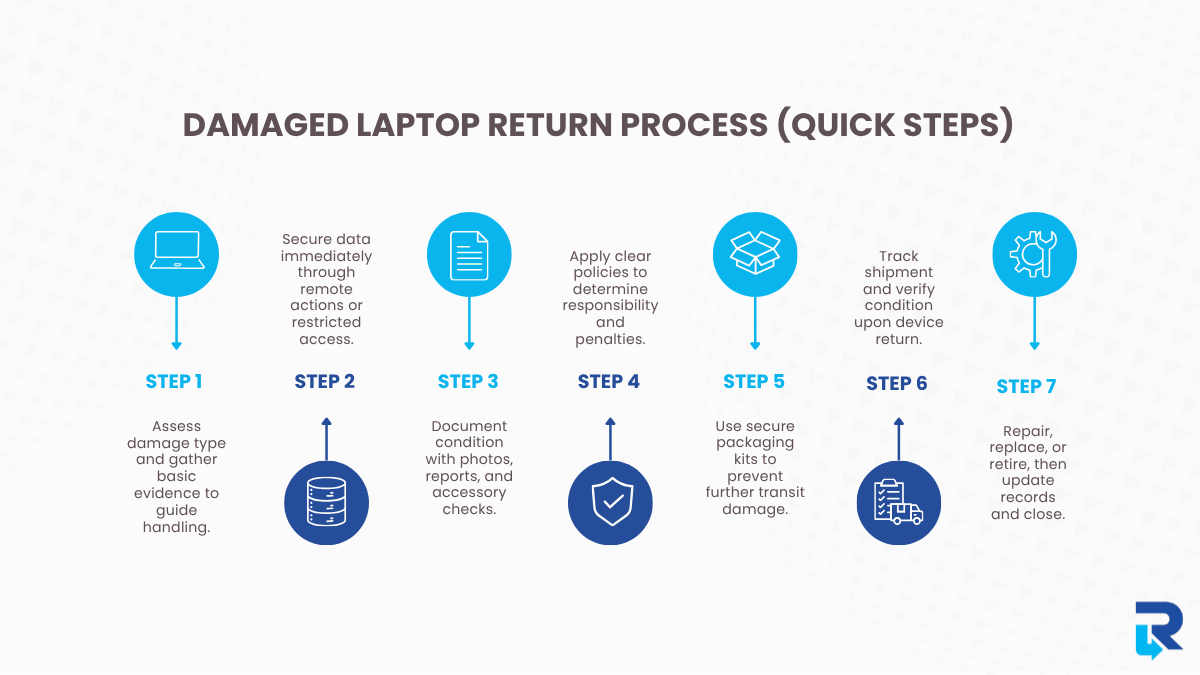
Step 1: Identify the Issue Before Retrieval
Before initiating logistics, clearly assess the issue:
-
Physical damage (screen, casing, liquid exposure)
-
Functional fault (boot failure, hardware issues)
-
Partial usability
Many organizations rely on IT asset tracking systems to quickly verify device history and condition before retrieval begins. Early clarity prevents confusion and helps determine the right handling approach from the start.
Going a step further, teams should gather basic evidence and context up front. This includes photos or videos of the device, a brief description of what happened, and whether the laptop is still accessible.
Even simple inputs help distinguish between accidental damage and hardware failure. This early assessment also guides next steps. A device that powers on may allow remote data actions, while a physically damaged one may need special packaging.
Step 2: Secure the Data First (Always)
Even when a device is damaged, data risk remains a priority. The best practices include:
-
Trigger remote lock or wipe (if accessible)
-
Disable all user access
-
Log last known activity
Implementing remote data security protocols ensures sensitive information is protected even before the device is physically retrieved.
These actions should be initiated as early as possible, ideally as soon as offboarding begins. Even partial access to the device can be enough to secure sensitive information, revoke credentials, and prevent unauthorized use.
If the device is non-functional:
-
Flag it for controlled handling upon arrival
-
Treat it as a high-risk asset until verified
In such cases, data cannot be immediately confirmed or erased, which increases uncertainty. That’s why these devices should be handled with stricter controls during retrieval and inspection.
Step 3: Standardize Damage Reporting
Relying on verbal updates creates gaps. Instead, you should require:
-
Photos or videos of the damage
-
A short employee condition report
-
Confirmation of included accessories
These inputs create a baseline record of the device’s condition before retrieval begins. Without this, it becomes difficult to determine whether damage occurred during usage, transit, or handling after return.
Large organizations like Accenture and Deloitte rely on structured asset tracking and return documentation as part of their IT and offboarding processes. As a result, standardized condition reporting, asset logs, and return confirmations help maintain accountability across remote teams.
This step formalizes documentation. It also establishes a shared understanding between the employee and the organization. Minimizing back-and-forth later and keeping the offboarding process moving efficiently.
Step 4: Understand Employee Liability & Penalties
When a laptop is returned damaged, there’s also the concern of penalties. In most cases, it depends on the company policy and the nature of the damage. Clear and predefined policies are extremely important here. Every employee should be aware of what constitutes acceptable use, what constitutes damage, and how responsibility is assessed.
An employee handbook can come in handy in such circumstances. Also, a structured exit checklist for remote employees can ensure that device returns, condition reporting, and accountability are clearly defined from the start.
When a penalty may apply
-
Damage caused by negligence or misuse
-
Ignoring handling guidelines
-
Failure to report issues promptly
-
Significant deterioration in condition
Organizations may respond by:
-
Charging repair or replacement costs
-
Applying a predefined damage fee
-
Delaying final clearance until resolved
For example, IBM’s damage fee framework outlines estimated charges such as $50–$300 for screen damage, $35 for a missing adapter, and up to $200 for damaged components. Depending on damage severity and type, the list goes on.
When penalties are usually avoided
-
Normal wear and tear
-
Genuine hardware failure
-
Transparent and timely reporting
Clear documentation helps distinguish between accidental damage and negligence, ensuring fair outcomes.
Step 5: Use Protective, Pre-Configured Return Kits
Damaged laptops are more vulnerable during transit. The following measures can prevent the risk of further damage:
-
Prepaid return packaging
-
Shock-resistant materials
-
Clear packing instructions
Companies like Onepak specialize in remote device retrieval by providing pre-configured return kits for employees. These kits include protective packaging, prepaid shipping labels, and clear packing instructions. Thus making sure devices are returned safely and consistently.
This is especially critical for devices that are already broken, because handling them wrong might make the problem worse or make it hard to assess when they arrive.
Step 6: Maintain Tracking, Chain of Custody & Inspection
With faulty devices, visibility is imperative. You should ensure:
-
Real-time tracking
-
Status updates across teams
-
Proof of dispatch and delivery
Tracking isn’t just about location; it’s about maintaining a verifiable chain of custody from dispatch to receipt.
Once the device is received:
-
Verify physical condition
-
Test functionality
-
Confirm data status
An organized intake procedure ensures that the device’s state matches what was reported before it was returned. This can help identify when and where any discrepancies occurred.
And if the devices are shipped across regions, domestic vs international retrieval challenges impact timelines. Luckily, logistics providers like FedEx and UPS enable real-time shipment tracking with time-stamped updates at every stage, from pickup to delivery.
Without proper tracking and inspection, organizations face blind spots, delayed decisions, and increased risk.
Step 7: Triage, Resolution & Closure
After inspection, route the device into the appropriate path:
-
Repair and redeploy
-
Refurbish
-
Retire or replace
These decisions should balance cost, usability, and operational needs. Organizations often spend too much on replacements or miss chances to get value from assets they already own when they don’t have an organized triage.
Lastly,
-
Update asset records
-
Document final condition
-
Resolve cost implications
-
Confirm closure with HR
Typically, a company like Dell follows structured device lifecycle management processes to ensure efficient resolution and proper asset management.
Common Mistakes to Avoid
There are certain mistakes that stem from assuming that all device returns follow the same process.
-
Treating damaged devices like standard returns: Damaged assets require additional checks, handling, and documentation.
-
Skipping data security steps: Even non-functional devices may still hold sensitive data.
-
Lack of documentation: Without photos, reports, or records, it becomes difficult to verify when and how the damage occurred.
-
Letting employees manage shipping independently: Uncontrolled packaging and courier choices can result in further damage or lost devices.
-
No clear repair vs. replace criteria: Without defined guidelines, decisions become inconsistent and costly.
Conclusion
Handling a damaged or faulty laptop during remote offboarding isn’t just about getting the device back. It’s about managing the situation smoothly from start to finish.
With the right processes in place and clear communication, teams can avoid confusion and reduce the risks associated. In this way, the experience can be made easier for everyone involved.
In a remote setup, success comes down to handling the process with clarity and fairness. So, both the organization and the employee know exactly what to expect. With Remote Retrieval, you can ensure secure device recovery, standardized handling, and complete visibility at every step of the process.