
To ship a laptop without the original box safely, use adequate cushioning, a sturdy box, and secure internal packaging. A laptop shipped without original packaging should at least have 3 to 4 inches of air-cell cushioning on all sides. Empty spaces should be filled to prevent movement. Proper packing plays a key role in preventing shipping damage, particularly when the laptop’s original packaging is unavailable. The right box size, cushioning materials, and packing technique help keep the device secure throughout transit.
Key Takeaways
- Choose the Right Box: Select a sturdy shipping carton with enough room for protective cushioning.
- Protect the Laptop: Use multiple cushioning layers to secure the screen, corners, and internal components.
- Pack Accessories Separately: Keep chargers, headphones, and cables individually wrapped to prevent scratches and impact damage.
- Follow Battery Rules: Check lithium-ion battery requirements before choosing a carrier or shipping method.
- Secure the Shipment: Seal the carton properly, verify the shipping label, and choose a carrier with suitable tracking and protection.
- Understand Packaging Risks: Proper packaging reduces physical damage, battery hazards, and avoidable replacement costs.
The importance of proper packaging is evident through this shipping case study in which an electronics retailer shipping 800 packages monthly reduced its damage rate from 4.2% to 0.8% after introducing double-wall boxes, better cushioning, and appropriately sized cartons. Although shipping involved multiple electronics rather than laptops, it highlights how packaging can help reduce damage.
This guide will explain how to ship a laptop without the original box, how to pack essential laptop accessories separately, and the importance of proper laptop packaging.
How to Prepare Your Laptop Before Shipping
Back up important data, shut down the device, gather essential items, wrap the laptop, place the laptop in a box, seal and label the device, and hire a reliable shipping partner. Organizations may share this guide for remote employees across multiple locations to ensure safe return of their laptop. We’ve explained every step in detail below:
Step 1: Back Up the Laptop’s Data
Back up your laptop’s data using an external hard drive, USB drive, or cloud storage service. This protects your data if the laptop gets lost or damaged. Sign out of all personal accounts and remove saved payment information. Record the laptop’s serial number and capture the device’s physical condition before shipping.
Step 2: Shut down the Laptop
Completely shut down the laptop – do not put it in sleep or hibernation mode. Disconnect the charger, USB devices, headphones, and other accessories. If your laptop has a removable battery, see your carrier’s requirements before deciding whether to remove it. If you remove the battery, pack it separately. If the battery is built-in, do not remove it.
Between the keyboard and display, place a thin layer of soft foam or screen protector for additional protection. Also, cover the power button to minimize the risk of accidental activation.
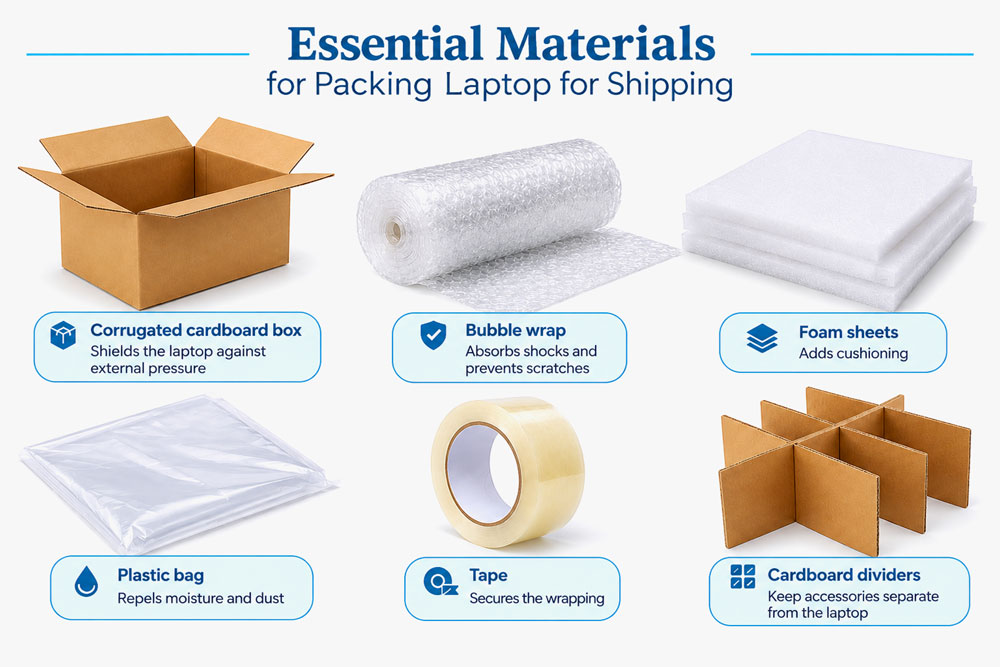
Step 3: Gather Essential Packaging Materials
In case the manufacturer’s packaging isn’t available, you need to gather materials to create multiple layers of protection.
Essential Materials for Packing Laptop for Shipping
Step 4: Wrap the Device in Protective Cushioning
It is best to learn how to pack your laptop for safe return beforehand. Place the laptop inside a snug-fit plastic bag, and wrap it in several layers of bubble wrap. Ensure the bubble wrap covers the screen, keyboard, edges, and corners. Avoid excessive pressure on the screen. The goal is to create a protective layer that absorbs shocks without putting pressure on the laptop’s components.
Step 5: Place the Laptop in a Corrugated Cardboard Box
Add cushioning to the bottom of the box and place the wrapped laptop over it, in the center. Insert foam in the remaining gaps so that the device stays firm in one place and does not touch the box’s walls.
Consider double-boxing for an extra layer of protection. Place the packed laptop inside a second, larger box that has cushioning between the two boxes.
Step 6: Seal and Label the Shipping Box
Close the box and seal it with strong packing tape. Use the H-taping method to tape the box. Before shipping, ensure that the box has no openings or tears. Also, the laptop should not move when you shake the box gently.
Step 7: Appoint a Reliable Shipping Service
Hire a shipping carrier that accepts laptop returns with lithium-ion batteries. Check its packaging, battery, and shipping requirements before handing over the package.
Hire a shipping partner that:
- Provides shipment tracking and delivery updates
- Ensures on-time delivery and offers fast shipping if needed
- Allows laptops with lithium-ion batteries
- Provides proof of delivery if requested
How to Pack Laptop Accessories for Shipping
Use small protective bags, bubble wrap, and individual compartments to keep everything organized. This helps prevent them from scratching the laptop and putting pressure on any part of the device.
Step1: Charger and power adapter
Use bubble wrap to wrap the power adapter. Coil the cable loosely and secure it with a reusable cable tie. Do not bend the cable or wrap it tightly around the adapter.
Step 2: Headphones and earphones
Place headphones and earphones in a small protective case. Wrap over-ear headphones in bubble wrap, ensuring the ear cups and headband are not damaged.
Step 3: USB drives and memory cards
Use small plastic cases or padded envelopes to prevent scratches and loss.
Step 4: Mouse and keyboard
Wrap wireless or wired mice in bubble wrap. If shipping a separate keyboard, use foam sheets to cover the keys.
Why Is Secure Laptop Packaging Important for Shipping?
Proper laptop packaging helps protect from physical damage, environmental exposure, and transportation mishaps.
-
Prevents Physical Damage
Laptops contain sensitive components, such as displays, hinges, motherboards, and storage drives. Accidental drops, pressure, or vibrations can damage these parts. But with the right packaging and protective cushioning, these shocks are absorbed, keeping the device safe.
-
Protects Against Moisture and Dust
Moisture and dust are two main culprits of laptop damage. Circuit boards, charging ports, and other electronic components are sensitive to moisture and dust. A protective plastic bag and properly sealed shipping carton provide an additional barrier against environmental exposure.
-
Prevents Accessory and Component Loss
Individual wrapping ensures that chargers, headphones, and USB adapters do not scratch the laptop or damage its ports.
-
Reduces Lithium-Ion Battery Hazards
Physical damage to lithium-ion batteries can cause internal short circuits, overheating, and thermal runaway. With secure packaging, the risk of potential fire hazards can be reduced.

What Are the Common Mistakes to Avoid When Shipping a Laptop Without Its Original Box?
Even if a laptop is packed according to guidelines, certain mistakes can still compromise its safety during transit. Here’s a list of common mistakes to take care of while shipping a laptop without its original box:
-
Using Materials That Generate Static Electricity
Using synthetic packaging materials, such as ordinary plastic bags, and foam peanuts may lead to static electricity generation through friction. ESD can damage certain sensitive electronic components, including memory modules, circuit boards, and internal connectors.
-
Applying Excessive Pressure to the Display
Do not place heavy items inside the same compartment as the laptop, place heavy objects on top of a packed laptop, or use tight internal restraints. These mistakes can lead to LCD damage, pressure marks, or cracks.
-
Exposing Laptop to Hot and Cold Temperatures
Avoid leaving a laptop in an extremely hot or cold location before shipment, as major temperature fluctuations may develop condensation when moved into a warmer environment. Moisture can gather on internal components and further lead to electrical faults.
Expert Tips for Shipping Laptops Without Original Packaging
With years of experience managing laptop returns, Remote Retrieval is well aware of shipping challenges. Here are our expert tips to help businesses prevent transit damage and simplify laptop returns.
-
How Does Battery Capacity Affect Shipping Requirements?
A laptop’s battery capacity can impact its shipping classification and applicable requirements. For example, lithium-ion batteries with a rating of up to 11 Wh usually fall under less restrictive provisions than higher-capacity batteries. Check the battery label or manufacturer’s specifications before booking transportation.
-
Why Test Packaging Before Regular Shipments?
Organizations that ship laptops regularly should test packaging using an appropriate process to help identify weak points before rolling out the same packaging across multiple locations. The ISTA develops a test procedure that simulates transportation hazards, including vibration, shock, and compression.
-
What Box Size is Appropriate for Shipping Laptops?
Shipping services usually charge based on a package’s size instead of actual weight. Oversized boxes may contribute to increasing shipping costs, even if the device is lightweight. Ensure you choose the right size of the box to prevent spending extra.
How Much Does Shipping a Laptop Cost?
The cost of shipping a laptop may vary depending on the packaging material, location, delivery speed, and additional services. Let’s consider Remote Retrieval packages as an example to see how much it costs to ship a laptop without the original box.
The starting price of a laptop retrieval is $77, which includes:
- A laptop return box with protective packaging materials
- A prepaid return shipping label
- Shipment tracking from dispatch to final delivery
- Employee email and SMS reminders
- Customer support throughout the retrieval process
After 10 laptop retrieval orders, the standard rate will be $87 per laptop retrieval.
The price may add up if a business chooses extra services, such as:
| Additional service | Price |
| Data wipe and return to company | $29 |
| Data wipe and delivery to a new employee | $49 |
| Second-day express delivery | $99 |
| 15-day secure storage with data wipe | $14.99 |
| 30-day secure storage with data wipe | $24.99 |
| Signature confirmation | $9.99 |
You may further compare popular brands with Remote Retrieval to gain better insights.
Conclusion
Shipping a laptop without its original box doesn’t have to be risky. What matters is matching the standards of the manufacturer’s packaging. From picking a suitable shipping carton to securing accessories and checking battery regulations, every precaution helps reduce avoidable shipping problems.
However, packaging is just half of the problem. Appointing the right laptop return partner like Remote Retrieval is equally important.
Frequently Asked Questions (FAQs)
Can I ship a laptop using a regular cardboard box?
Yes, if the box is sturdy, undamaged, and spacious enough to accommodate protective cushioning, you may use it to ship the device. However, do not use thin grocery or moving boxes that may collapse under pressure.
Is it important to declare the laptop’s value when shipping?
Yes, it is important to declare the laptop’s accurate value for applicable carrier liability or shipping protection. Keep the purchase receipt or another proof of value in case you need to file a damage or loss claim.
Is it possible to ship internationally without its original box?
Yes, international shipment is possible without its original box. However, international shipping may require customs documentation, such as the laptop’s description, declared value, country of origin, and applicable tariff classification.
What to do if my laptop gets damaged during shipping?
Capture the damaged packaging and laptop. Keep the shipping receipt, tracking details, and proof of the device’s pre-shipment condition. Reach out to the carrier to initiate a damage claim and follow its inspection and documentation requirements.
Is it better to ship a laptop by ground or air transportation?
Ground shipping is recommended as it helps avoid air transport lithium battery restrictions. However, the best choice may vary according to the carrier’s battery policies, delivery distance, transit time, and handling requirements.