
In a remote or hybrid workplace, company laptops rarely stay within office walls. They travel between cities, states, and sometimes countries as employees join, move roles, or leave the organization. What happens after a laptop is returned is often overlooked, yet it is one of the most important parts of IT asset management.
A retrieved laptop does not simply get handed to the next employee. It moves through a carefully managed process that includes shipping, tracking, data removal, inspection, refurbishment, inventory updates, and provisioning. Each step helps protect company information, extend hardware lifespan, and reduce unnecessary technology spending.
Secure Your Laptop’s Return Today
This article follows the complete journey of a company laptop, from an employee’s home office to its eventual reassignment to a new user.
Why Companies Retrieve and Reassign Employee Laptops
Replacing every laptop when an employee leaves would be expensive and wasteful. Most business devices still have years of useful life left, making retrieval and redeployment a practical strategy for organizations of all sizes.
A structured recovery process helps companies:
- Lower hardware procurement costs by extending device lifecycles.
- Recover laptops from remote employees instead of purchasing replacements for every new hire.
- Protect sensitive business information from unauthorized access.
- Maintain accurate asset inventories and ownership records.
- Support sustainability initiatives by reducing electronic waste.
- Meet internal policies and external compliance requirements.
- Improve onboarding by keeping deployment-ready devices in stock.
The security aspect is especially important. An unreturned laptop may contain company emails, documents, customer records, or credentials. According to IBM’s Cost of a Data Breach Report, the global average cost of a data breach reached $4.44 million in 2025. While a missing laptop does not automatically constitute a breach, organizations cannot ignore the risks posed by unreturned laptops, particularly when they contain sensitive data or stored credentials.
Here’s what the journey of a retrieved laptop looks like:
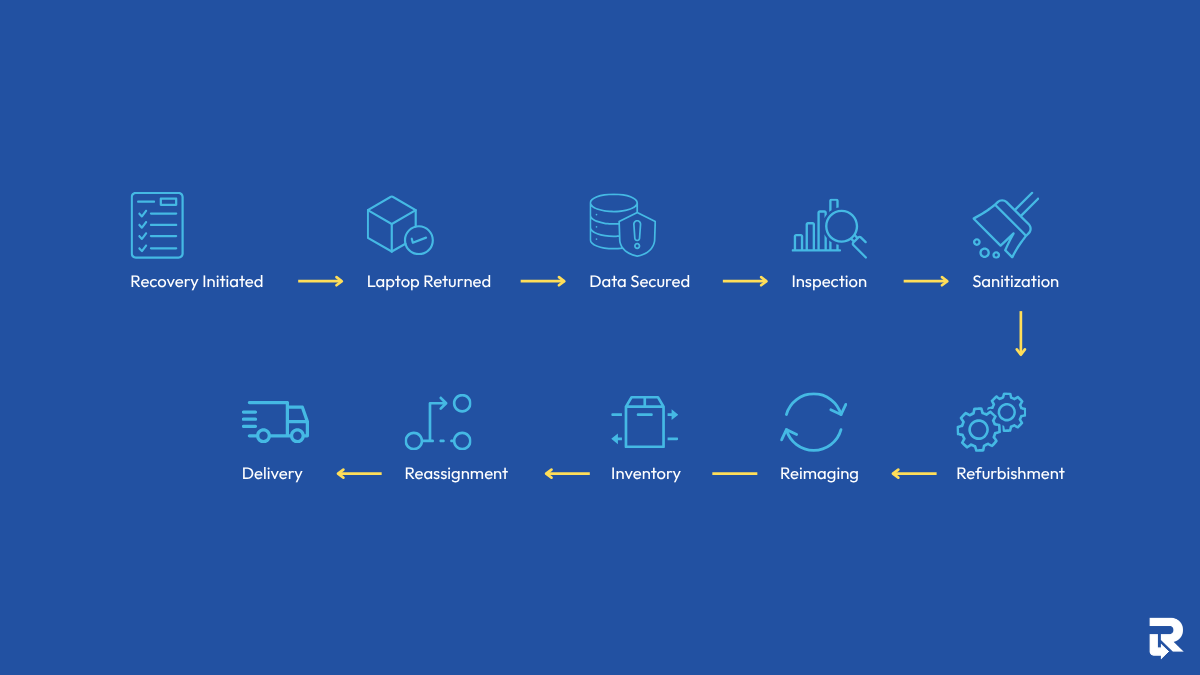
Recovery Initiated → Laptop Returned → Data Secured → Inspection → Sanitization → Refurbishment → Reimaging → Inventory → Reassignment → Delivery
Secure Your Laptop’s Return Today
Step 1: Triggering the Laptop Recovery Process
The journey begins as soon as an employee’s departure is confirmed. Whether the exit is planned or unexpected, organizations need a process that ensures company-owned equipment is identified and scheduled for return before important details are forgotten.
HR Initiates the Offboarding Workflow
In many organizations, HR starts the process by updating the employee’s status in the HR platform. This action typically triggers notifications to IT, security, and asset management teams.
At this stage, teams review:
- Assigned laptop details
- Asset tag and serial numbers
- Employee location
- Return deadlines
- Any accessories issued alongside the laptop
Having a documented process is especially important for companies that need to recover laptops from remote employees spread across different cities or regions.
Creating a Recovery Plan
Before contacting the employee, IT confirms what equipment should be returned.
This often includes:
- Laptop
- Charger
- Docking station
- External monitor
- Security keys or authentication tokens
- Company-issued mobile devices
The goal is to create a complete record before recovery begins.
Why Acting Quickly Matters
The longer a device remains outside company control, the more difficult it can become to retrieve. Employees may relocate, shipping information may change, or equipment may become damaged while sitting unused.
A prompt recovery process reduces these risks and keeps asset records accurate.
Step 2: Returning the Laptop From the Employee’s Home
Once the recovery request is created, the next step is getting the laptop back safely.
Most organizations try to make the process as simple as possible. If returning equipment becomes complicated, delays become more likely.
Preparing the Return Shipment
Many companies send employees:
- A prepaid shipping label
- Protective packaging materials
- Printed return instructions
- Courier drop-off information
Providing everything upfront removes guesswork and encourages faster returns.
Maintaining Shipment Security
A laptop often contains sensitive company information, making shipping security just as important as convenience. Establishing secure device returns helps organizations reduce the risk of loss, theft, or unauthorized access while equipment is in transit.
To reduce risk, organizations typically:
- Use tracked shipping services
- Require delivery confirmation
- Document custody transfers
- Record shipment milestones
- Monitor return status until arrival
Domestic vs. International Laptop Retrieval Challenges
Recovery becomes more complex when employees work outside the company’s primary operating region. Laptop retrieval challenges also exist; for instance, domestic returns are usually straightforward, but international recoveries may involve:
|
Challenge |
Potential Impact |
|
Customs clearance |
Delayed deliveries |
|
Import/export regulations |
Additional paperwork |
|
Regional courier limitations |
Limited tracking visibility |
|
Taxes and duties |
Higher recovery costs |
|
Extended transit times |
Longer asset recovery cycles |
For global organizations, these factors often influence how recovery programs are designed.
Step 3: Securing Company Data Before the Device Arrives
Even while a laptop is being shipped back, the organization must continue protecting the information stored on it.
This stage focuses on minimizing the cybersecurity risks of unreturned laptops and ensuring company data remains secure throughout transit.
Revoking Employee Access
One of the first actions taken after offboarding is disabling access to corporate resources.
This commonly includes:
- Company email
- VPN connections
- Cloud storage platforms
- Remote work collaboration tools
- Internal business applications
Removing access prevents former employees from connecting to sensitive systems after their departure.
Using Remote Management Tools
Modern endpoint management platforms allow IT teams to manage devices remotely.
Administrators can often:
- Lock devices remotely
- Remove company accounts
- Restrict application access
- Monitor device status
- Initiate remote wipe procedures
Preparing for Unexpected Situations
Not every recovery goes according to plan.
Devices may be:
- Lost in transit
- Damaged during shipping
- Delayed for weeks
- Returned with security concerns
Having remote controls in place provides an additional layer of protection until the laptop reaches its destination.
According to IBM’s Cost of a Data Breach Report, the average global cost of a data breach reached $4.88 million in 2024, highlighting why organizations take endpoint security seriously.
Step 4: Receiving and Inspecting the Returned Laptop
Once the laptop arrives, it enters a controlled intake process.
Before any refurbishment or redeployment can occur, technicians need to verify the condition of the device and confirm that the correct asset has been returned.
Logging the Device Into Inventory
The first step is recording the laptop’s arrival.
Teams typically document:
- Asset tag number
- Serial number
- Device model
- Date received
- Recovery ticket number
- Employee association history
This creates a complete audit trail for future reference.
Performing a Physical Inspection
Technicians then evaluate the laptop’s condition.
Areas commonly inspected include:
- Display quality
- Battery health
- Keyboard functionality
- Webcam performance
- Ports and connectors
- Chassis condition
Common Inspection Checklist
|
Component |
What Is Checked |
|
Screen |
Cracks, dead pixels, discoloration |
|
Battery |
Capacity, charging performance |
|
Keyboard |
Missing or unresponsive keys |
|
Ports |
USB, HDMI, charging ports |
|
Webcam |
Functionality and image quality |
|
Chassis |
Cosmetic and structural damage |
Grading the Device
Many organizations classify returned laptops based on condition.
Typical categories include:
- Excellent condition
- Minor wear
- Moderate wear
- Repair required
- End-of-life
This assessment determines whether the device moves forward to refurbishment or retirement.
Step 5: Data Sanitization and Compliance Verification
Before a laptop can be reassigned, all information associated with the previous user must be removed. This is one of the most important stages of the entire lifecycle.
Why Deleting Files Is Not Enough
Simply deleting files does not permanently remove data from a storage drive. Fragments of information may still be recoverable using specialized software.
For that reason, organizations rely on certified data sanitization processes designed to eliminate all recoverable data.
Performing Certified Data Erasure
IT teams use dedicated tools that overwrite storage media and verify successful erasure.
The process often includes:
- Device verification
- Erasure execution
- Validation testing
- Reporting
- Certification
Data Sanitization Workflow
|
Stage |
Purpose |
|
Device Verification |
Confirms asset identity |
|
Data Erasure |
Removes stored information |
|
Validation Scan |
Confirms successful wipe |
|
Report Generation |
Creates audit documentation |
|
Certification |
Provides proof of sanitization |
Meeting Regulatory Requirements
For many organizations, secure data removal is not just a best practice. It is a compliance requirement.
Important compliance considerations for devices may include:
- Data privacy regulations
- Industry security standards
- Internal governance policies
- Customer contractual obligations
- Audit requirements
Many organizations generate a Certificate of Data Destruction after successful erasure to support future audits and reporting.
Step 6: Refurbishing the Laptop for Continued Use
Once the data has been removed, attention shifts to restoring the laptop to a condition suitable for another employee.
Cleaning and Cosmetic Restoration
Years of daily use can leave visible signs of wear.
Technicians typically:
- Remove old asset labels
- Clean keyboards and screens
- Sanitize external surfaces
- Remove adhesive residue
- Restore the device’s appearance
A clean device helps create a better experience for the next user.
Repairing or Replacing Components
Not every laptop returns in perfect condition.
Common repairs include:
- Battery replacement
- Keyboard replacement
- SSD replacement
- Charger replacement
- Fan maintenance
Extending Device Lifespan
According to research from the United Nations Institute for Training and Research, extending the usable life of electronic devices can significantly reduce electronic waste generation and lower demand for new manufacturing.
Refurbishment helps organizations maximize value from existing hardware while reducing unnecessary purchases.
Step 7: Reimaging and Re-Enrolling the Device
After refurbishment, the laptop receives a completely fresh software environment.
Installing a Clean Operating System
Technicians deploy a standardized operating system image that aligns with company requirements.
This typically includes:
- Latest operating system version
- Security updates
- Driver updates
- Corporate configurations
Re-Enrolling the Device Into Management Platforms
Most organizations use Mobile Device Management (MDM) or Unified Endpoint Management (UEM) platforms.
These systems allow administrators to:
- Enforce security policies
- Deploy software
- Manage updates
- Monitor compliance
Standardizing the User Experience
Before deployment, approved applications are installed or assigned.
Common examples include:
- Productivity suites
- Communication tools
- VPN software
- Endpoint protection software
- Industry-specific applications
The result is a laptop that is fully prepared for reassignment.
Step 8: Returning the Laptop to Active Inventory
After testing and configuration, the laptop moves back into the organization’s inventory pool.
Updating Asset Records
Asset management systems are updated with:
- Current condition
- Repair history
- Warranty information
- Deployment status
- Location details
Accurate records help organizations make informed purchasing and lifecycle decisions.
Assigning a New Asset Status
Many organizations classify redeployment-ready devices using designated inventory categories.
Examples include:
- Ready for deployment
- Reserved
- In testing
- Awaiting repair
Maintaining Inventory Visibility
Keeping inventory data current helps IT teams quickly identify available equipment whenever a hiring need arises.
Step 9: Assigning the Laptop to a New Employee
The laptop is now ready for its next user.
Selecting the Appropriate Device
Not every employee requires the same hardware specifications.
IT teams consider:
- Job responsibilities
- Performance requirements
- Department needs
- Software demands
Matching devices to roles improves productivity and user satisfaction.
Provisioning User Access
Before shipment, administrators assign:
- User profiles
- Software licenses
- Security permissions
- Department-specific applications
This ensures the device is ready for use immediately after delivery.
Conducting Final Quality Checks
Prior to shipment, technicians often perform:
- Login testing
- Connectivity testing
- Security validation
- Application verification
This final review reduces onboarding issues later.
Step 10: Delivering and Provisioning the Device
The final stage completes the laptop’s journey.
Shipping to the New Employee
Once configured, the laptop is securely packaged and shipped to its new owner.
Organizations typically track:
- Shipment status
- Delivery confirmation
- Receipt acknowledgement
First-Day Setup Experience
When the employee receives the laptop, setup is usually straightforward.
Typical onboarding steps include:
- Connect to Wi-Fi.
- Sign in using company credentials.
- Complete multi-factor authentication.
- Allow automated configuration to finish.
Automatic Deployment of Settings and Applications
Modern management platforms can automatically install:
- Business applications
- Security controls
- VPN configurations
- Compliance settings
- Productivity tools
Within a short period, the laptop is fully operational and ready to support the employee’s daily work.
Secure Your Laptop’s Return Today
Managed Recovery vs. DIY Laptop Retrieval
Some organizations manage recovery programs internally, while others partner with IT asset recovery specialists.
A DIY laptop retrieval approach may work for smaller businesses with limited device volumes. However, organizations with remote workforces often benefit from specialized providers that can coordinate logistics, maintain chain-of-custody records, perform certified data sanitization, and prepare devices for redeployment at scale.
Conclusion
A company laptop does not end its life when an employee leaves. It simply changes hands. From recovery and shipping to sanitization, repair, and redeployment, each stage plays a role in keeping devices secure and useful for longer.
When this process is structured, organizations reduce risk, avoid unnecessary hardware costs, and keep sensitive data protected at every step. It also ensures new employees receive ready-to-use devices without delays or confusion.
For businesses looking to simplify global asset recovery and ensure consistent handling across locations, Remote Retrieval offers support for safe, trackable, and secure device returns worldwide.